DNS Record Types

How Does a Browser Know Where a Website Lives?
Imagine you're trying to call a friend. You could dial their phone number from memory, but most of us keep our friends' numbers saved in our phone's contact list. Instead of remembering "555-1234," you just tap "Sam", and your phone looks up his number automatically.
The internet works the same way, except the "friends" are websites and email services, and the "contact list" is called the Domain Name System, or DNS.
When you type "google.com" into your browser, your computer doesn't actually understand that name—computers think in numbers, specifically IP addresses (like 142.251.32.14). Your computer needs to look up "google.com" in the Internet’s address book to find the actual number. That lookup happens instantly, usually in a fraction of a second, and that's when DNS records come into play.
Think of DNS as the phonebook of the internet. Just as a phonebook maps people's names to their phone numbers, DNS maps website names (like example.com) to their IP addresses (like 192.0.2.1). But DNS is much more sophisticated than a simple phonebook—it also stores information about where to send emails, who manages the domain, and various verification details.
What Is DNS in Very Simple Terms?
Let's break this down even more simply.
Every device on the internet—your computer, a website's server, an email server—has a unique address, similar to how every house has a street address. This address is an IP address, and it's just a series of numbers.
However, remembering numbers like "192.0.2.1" is difficult for humans. So someone invented a better system: we could refer to services by human-friendly names instead. That's where DNS comes in.
DNS is a massive, distributed directory service spread across computers all over the world. When you type a domain name into your browser, your computer asks a DNS server, "What's the IP address for this name?" The DNS server looks through its records and replies with the answer.
Here's the straightforward chain of events:
You type a website name into your browser (like example.com)
Your computer asks a DNS server for the IP address
The DNS server looks it up in its records
The DNS server responds with the IP address (like 192.0.2.1)
Your browser connects to that address and loads the website
That entire process happens in milliseconds, and you don't notice it at all. The whole system is remarkably fast and efficient.
Why Do DNS Records Need to Exist?
Here's the fundamental question: if there were just one giant DNS record that said "example.com → 192.0.2.1," wouldn't that be enough?
Not quite. Here's why DNS records need to be more organised and detailed:
Organisation and Multiple Services
A single domain might host multiple services. For example, someone might run a website on one server and have email handled by a completely different service (like Gmail). You need separate records to point each service to the right location.
Direction and Responsibility
Different parts of the internet need to know what they should do with information for a domain. When you send an email to someone@example.com, the email system needs specific instructions: "Send this email to this particular mail server." When you visit example.com in your browser, the system needs different instructions: "Connect to this web server."
Delegation and Control
Large organisations might split DNS management across different teams or providers. NS records act like a chain of responsibility—they tell the system, "Go ask this other server for information about that part of the domain."
Redundancy and Reliability
You can have multiple records of the same type pointing to different servers. If one server goes down, another can take over. Email is a perfect example—a domain might have two MX records so that if the primary email server is offline, messages still get delivered to a backup.
Verification and Security
Some records exist just to prove you own your domain (like TXT records for domain verification) or to protect your email from being spoofed (SPF records). These are security measures that wouldn't be possible with just one simple address lookup.
In essence, DNS records exist because the Internet is complex, and different services need different instructions.
DNS Record Types
NS Records: "Who's in Charge of This Domain?"
What problem does this solve?
Before any other DNS record for your domain can be queried, the Internet needs to know which server is responsible for managing all of your domain's records. NS records answer that question.
Real-life analogy:
Imagine a large company with many offices across a country. When someone wants to know information about the company's Boston office, they need to know which regional headquarters handles Boston. NS records are like a directory that says, "Questions about example.com? Ask the server at ns1.example.com."
How it works:
An NS record (NS stands for "Nameserver") points a domain to one or more authoritative nameservers—these are the servers that actually store and serve all the DNS records for your domain. When the global DNS system needs to find information about example.com, it looks at the NS records to find out which servers to ask.
Here's a simplified example:
example.com → NS record → "Ask ns1.example.com"
Why it matters:
Without NS records, the Internet wouldn't know where to go to find information about your domain. The NS record is like a signpost that directs traffic to the right destination. Typically, you'll have at least two NS records for redundancy—if one nameserver goes offline, the other can still answer questions about your domain.
Common beginner confusion:
"Doesn't the NS record point to an IP address?"
Not directly. NS records point to a server's name (like ns1.example.com), and that name then has its own A record pointing to an IP address. This might seem like an extra step, but it allows for flexibility and resilience.
A Record: "Domain → IPv4 Address"
What problem does this solve?
This is the most fundamental DNS record. It connects a human-readable domain name to the IP address of the server hosting your website. It's the bridge between "example.com" and "192.0.2.1."
Real-life analogy:
Think of an A record like a simple phone contact. "Sarah" → "555-1234." The A record is "example.com" → "192.0.2.1." It's a direct mapping from a name to an address.
How it works:
When you type example.com into your browser, the DNS system queries the nameservers for an A record. The A record says, "The IP address for example.com is 192.0.2.1." Your browser then connects to that IP address and loads the website.
Here's an example:
example.com → A record → 192.0.2.1
Why it matters:
This is how websites are actually found. Without A records, your browser would have nowhere to connect to. Most websites on the internet use A records to point to their web servers.
A little more detail (but still simple):
The "A" in A record stands for "address," and it specifically stores IPv4 addresses. IPv4 is the older version of the Internet’s addressing system, and it uses numbers like 192.0.2.1 (four numbers separated by dots, each number between 0 and 255).
AAAA Record: "Domain → IPv6 Address"
What problem does this solve?
The internet is running out of IPv4 addresses (those simple four-number addresses). To solve this problem, a newer addressing system called IPv6 was created. AAAA records do the same job as A records, but for IPv6 addresses.
Real-life analogy:
Imagine Sarah changed her phone number to a system with a much longer format: "555-1234-5678-9999-ABCD." A AAAA record is like storing that longer phone number, while an A record stores the short version.
How it works:
An AAAA record is nearly identical to an A record, except it stores a longer IPv6 address instead of an IPv4 address. For example:
example.com → AAAA record → 2001:0db8:85a3::8a2e:0370:7334
Notice how the IPv6 address is much longer and includes letters and colons. It looks more complex, but it works the same way as an A record—it tells the browser where to find the website.
Why it matters:
Not everything has switched to IPv6 yet, so most domains have both A records and AAAA records. This way, whether your internet connection uses the older IPv4 system or the newer IPv6 system, you can still reach the website.
Common beginner confusion:
"Do I need both A records and AAAA records?"
Most of the time, yes. This is called "dual stack" or supporting both versions. If you only have an A record, devices using only IPv6 might have trouble reaching your site. However, many organisations still prioritise IPv4.
CNAME Record: "One Name Pointing to Another Name"
What problem does this solve?
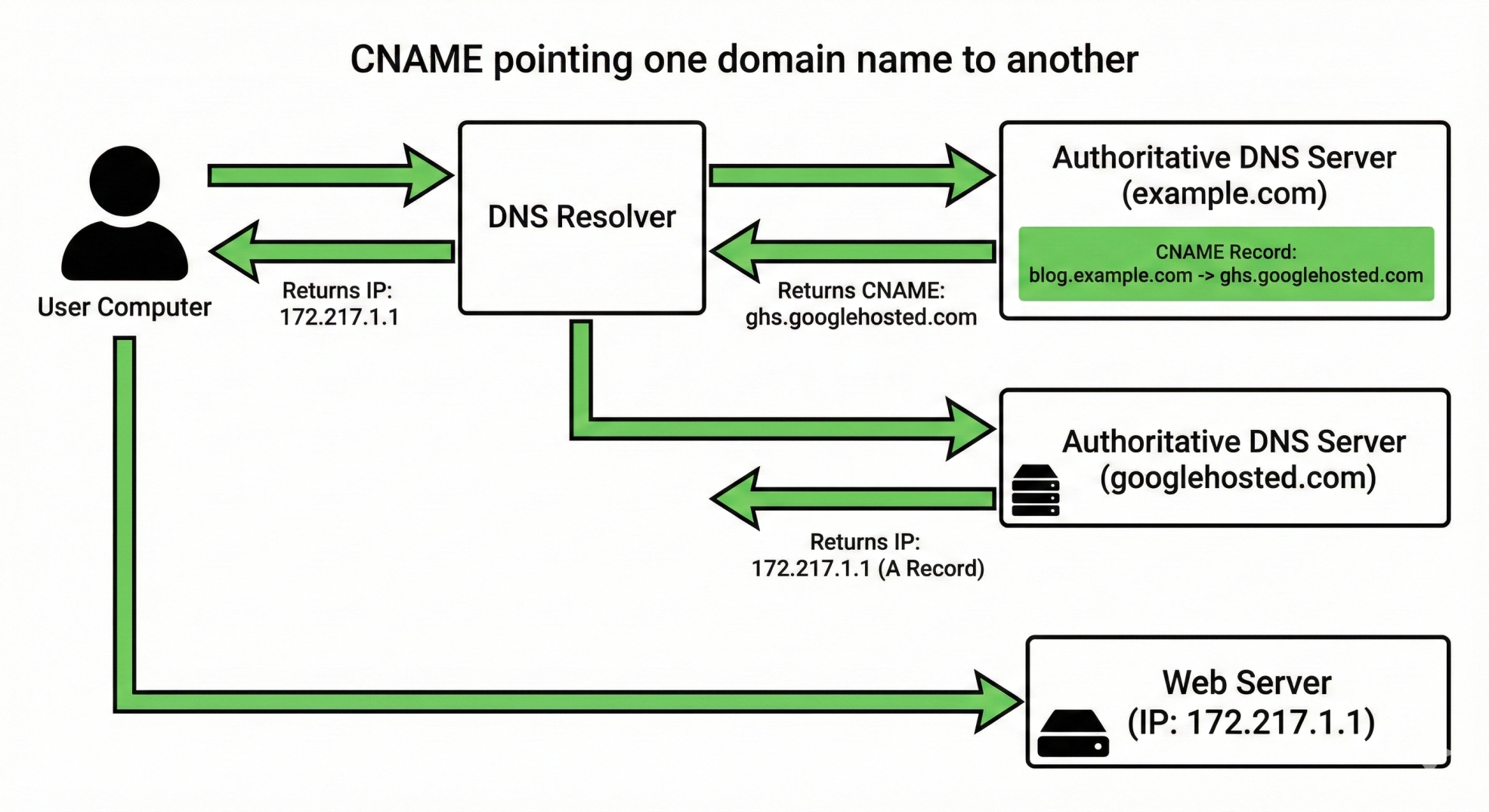
Sometimes you want multiple domain names to point to the same website. Instead of creating separate A records for each one, you can create a CNAME record that points one name to another name. This is elegant and saves you from having to update multiple records if the IP address changes.
Real-life analogy:
Imagine Sarah has a professional name and a nickname. In your phone, instead of saving the nickname separately, you could create a note that says "Sarah's nickname → Sarah." When you need to call the nickname, the phone looks it up and realises it's just another way to reach Sarah. A CNAME record works the same way.
How it works:
A CNAME record (CNAME stands for "Canonical Name") creates an alias—an alternative name that points to the actual name. Here's an example:
blog.example.com → CNAME record → example.com
example.com → A record → 192.0.2.1
In this setup, when someone visits blog.example.com, the DNS system says, "That's an alias for example.com. Let me look up example.com's IP address instead." It then finds the A record for example.com, which points to 192.0.2.1, and that's where the browser connects.
Why it matters:
CNAME records are incredibly useful for subdomains. Many websites have subdomains like "blog.example.com" or "shop.example.com." Instead of managing separate A records for each one, you can use CNAME records to point them all to the main domain. If the main domain's IP address changes, you only need to update one A record, and all the CNAME records automatically follow along.
Important limitation:
You cannot use a CNAME record for the root domain (example.com). You can only use CNAME records for subdomains (like blog.example.com, shop.example.com, etc.). The root domain must have an A record. Additionally, if a domain has a CNAME record, it cannot have any other records (like MX or TXT records) at that same level.
Common beginner confusion:
"How is a CNAME record different from an A record?"
A record: Maps a domain name directly to an IP address
CNAME record: Maps a domain name to another domain name, which then (eventually) leads to an A record with an IP address
Think of it this way: a CNAME is an extra step of indirection. It says "go here instead," while an A record is the final destination.
MX Record: "Where Should Emails Go?"
What problem does this solve?
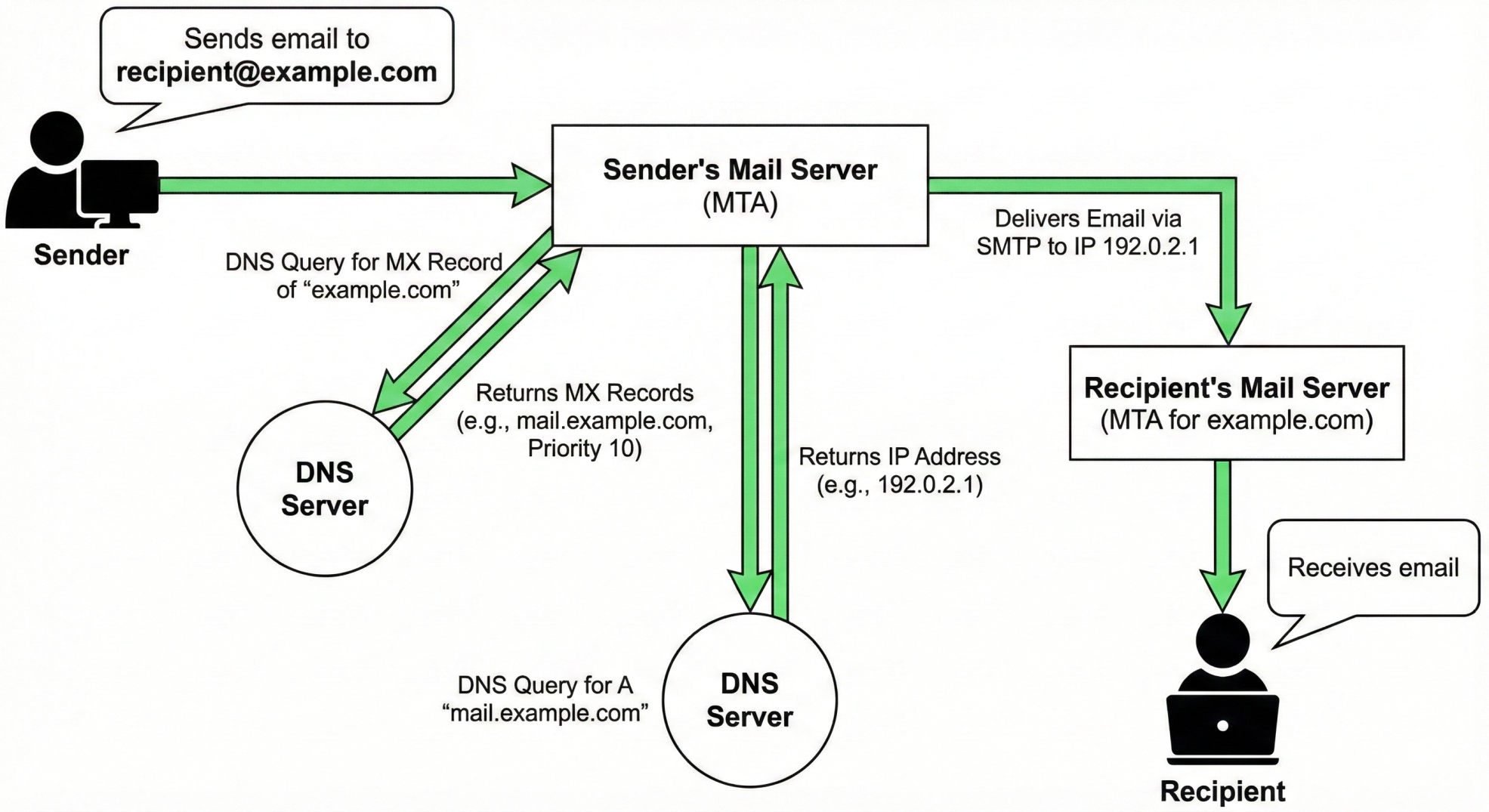
Email needs to be routed to mail servers, which are often on completely different servers from websites. When someone sends an email to user@example.com, the email system needs to know where to deliver that message. MX records solve this problem.
Real-life analogy:
Imagine you have a house and a separate mailbox at the post office. If someone wants to send you mail, you give them your address. But the postal service knows your mail address doesn't go to your house—it goes to the post office box. MX records work the same way: they tell the email system, "Don't send emails to the web server; send them to the mail server instead."
How it works:
An MX record (MX stands for "Mail Exchanger") specifies which server should receive emails for your domain. When someone sends an email to you@example.com, the sending mail server performs a DNS lookup for the MX record of example.com. The MX record tells it, "Emails for this domain should be sent to mail.example.com."
Here's an example:
example.com → MX record → mail.example.com
mail.example.com → A record → 192.0.2.2
So emails get routed to mail.example.com's IP address (192.0.2.2), which is completely separate from the website's server (192.0.2.1).
Priority and redundancy:
An important feature of MX records is that you can have multiple ones with different priorities. For example:
example.com → MX record (priority 10) → primary-mail.example.com
example.com → MX record (priority 20) → backup-mail.example.com
The sending mail server tries the primary mail server first (priority 10). If it's unreachable, the sending server automatically tries the backup (priority 20). Lower numbers mean higher priority—they're tried first.
Why it matters:
Without MX records, email wouldn't work for your domain. The email system would have no idea where to send your messages. MX records are essential for any organisation that receives email.
Common beginner confusion:
"Can the website and email use the same server?"
Technically, yes. If your domain doesn't have an MX record, some email servers will fall back to using the A record (the website's server) to try to deliver email. However, this is not recommended. Proper email delivery requires dedicated MX records pointing to mail servers. Additionally, most modern email systems have security checks that require proper MX records to prevent spam.
TXT Record: "Extra Information and Verification"
What problem does this solve?
Sometimes you need to store text-based information about your domain—things that aren't addresses or email servers. TXT records are flexible containers that can hold any text information. Two of the most important uses are verifying that you own the domain and helping secure email.
Real-life analogy:
Think of a TXT record like a sticky note attached to your mailbox. You can write anything on it—notes to yourself, messages to delivery drivers, or important information. TXT records work the same way: they're a place to attach text information to your domain.
How it works:
A TXT record simply stores one or more text strings associated with your domain. Here's a simple example:
example.com → TXT record → "This is an awesome domain!"
But TXT records are usually used for specific purposes, which we'll cover below.
Use Case 1: Domain Ownership Verification
Many online services (like Google, Microsoft, Amazon) require you to prove that you own your domain before you can use their services. They do this by asking you to add a unique TXT record to your domain's DNS.
Here's how it works:
You tell a service: "I want to use my domain example.com for this service"
The service says: "Okay, add this TXT record:
google-site-verification=abc123xyz"You add it to your domain's DNS settings
The service checks whether the TXT record exists
The service confirms: "Great, you own this domain!"
This is a clever way for services to verify ownership without needing you to own any server or file on the domain.
Use Case 2: Email Security (SPF Records)
One major problem with email is that it's easy to forge (fake) an email address. A spammer could send an email that appears to be from your company, even though your company didn't send it. This is called "email spoofing," and it's used for phishing attacks.
To prevent this, you can add a Sender Policy Framework (SPF) record, which is a special kind of TXT record. An SPF record tells receiving email servers: "These are the mail servers allowed to send email on behalf of my domain. If an email claims to be from my domain but doesn't come from one of these servers, it's probably fake."
Here's a simple example:
example.com → TXT record (SPF) → "v=spf1 mail.example.com -all"
This tells email servers: "Emails from my domain should only come from mail.example.com. If an email comes from anywhere else, reject it." The -all at the end means "reject everything else."
Why it matters:
TXT records are incredibly flexible and useful. Domain verification proves you own a domain without requiring server access. SPF records help prevent email spoofing and protect your brand. As the internet has evolved, TXT records have become essential for security and verification.
Common beginner confusion:
"Is a TXT record different from an SPF record?"
Technically, an SPF record is a type of TXT record. The difference is what information you put inside the TXT record. When you put SPF information in a TXT record, it becomes an SPF record. Think of it like a container: a TXT record is the container, and SPF is one possible type of content you can put in it.
How All DNS Records Work Together: A Real Example
Let's walk through a realistic scenario where someone visits your website and sends you an email. This will show how multiple DNS records cooperate seamlessly.
Setup:
Let's say you own the domain "mycompany.com," and you've set up the following DNS records:
| Record Type | Name | Points To |
| NS | mycompany.com | ns1.example.net |
| A | mycompany.com | 192.0.2.100 |
| MX | mycompany.com (priority 10) | mail.mycompany.com |
| MX | mycompany.com (priority 20) | backup-mail.mycompany.com |
| A | mail.mycompany.com | 192.0.2.101 |
| A | backup-mail.mycompany.com | 192.0.2.102 |
| TXT | mycompany.com | v=spf1 mail.mycompany.com -all |
Scenario 1: Someone visits your website
Alex opens a browser and types "mycompany.com"
Alex's browser needs an IP address. It asks: "What's the IP for mycompany.com?"
The DNS system consults the NS record to find out which server manages mycompany.com (ns1.example.net)
The DNS system asks ns1.example.net: "What's the A record for mycompany.com?"
The A record says: "192.0.2.100"
Alex's browser connects to 192.0.2.100 and loads your website
Time elapsed: A few milliseconds. The entire lookup is incredibly fast.
Scenario 2: Someone sends you an email
Jordan sends an email to "info@mycompany.com"
Jordan's mail server needs to know where to deliver the email. It asks: "Where do I send emails for mycompany.com?"
The DNS system consults the NS record to find the authoritative nameserver (ns1.example.net)
The DNS system asks ns1.example.net: "What are the MX records for mycompany.com?"
The MX records say: "Try mail.mycompany.com (priority 10) first, then backup-mail.mycompany.com (priority 20)"
Jordan's mail server looks up the A record for mail.mycompany.com and finds "192.0.2.101"
Jordan's mail server connects to 192.0.2.101 and delivers the email
But wait! The receiving mail server also checks the SPF record (the TXT record) and confirms that the email really came from an authorised mail server
The email is delivered to your inbox (assuming everything else checks out)
If the primary mail server (mail.mycompany.com at 192.0.2.101) were down, step 6-7 would fail, and the sending server would automatically try the backup MX record, connecting to 192.0.2.102 instead.
What you should notice:
Different records handle different jobs (website routing, email routing, security verification)
NS records act as the "director" pointing to the authoritative nameserver
The system has built-in redundancy (backup MX records)
Multiple records can coexist and cooperate without conflict
The whole process happens in milliseconds
Clearing Up Common Beginner Confusions
A Record vs. CNAME Record: What's the Real Difference?
The short answer: An A record points directly to an IP address. A CNAME record points to another domain name, which then eventually points to an IP address.
When to use which:
Use an A record for the main domain (example.com) and for subdomains that point to your own servers
Use a CNAME record for subdomains that point to another service (like a CDN or a third-party service)
Example that shows the difference:
Important reminder: You can't use a CNAME for your main domain; it must be an A record.
example.com → A record → 192.0.2.1          (direct IP)
blog.example.com → CNAME → example.com       (points to another name)
                        ↓
                      A record → 192.0.2.1   (eventually leads to same IP)
NS Record vs. MX Record: Both Point Somewhere, But...
These records look similar (they both point elsewhere), but they serve completely different purposes:
| NS Record | MX Record |
| Defines which server manages all DNS records for the domain | Defines which server receives emails for the domain |
| Points to a nameserver (a server that stores DNS records) | Points to a mail server (a server that stores emails) |
| Used by the global DNS system to find where to look | Used by email systems to route messages |
| How many you need: At least 2 for redundancy | How many you need: At least 1, but often 2+ for redundancy |
| Example: ns1.example.com | Example: mail.example.com |
Here's an analogy:
NS record: "If you want to know anything about my domain, ask this person"
MX record: "If you want to send me an email, send it to this place"
They're answering different questions, even though they both point to servers.
Summary: DNS as the Internet's Phonebook
The internet needs a way to translate human-friendly domain names (like google.com) into computer-friendly IP addresses (like 192.0.2.1). That translation system is DNS—the internet's phonebook. But unlike a simple phonebook that just has names and numbers, the internet's phonebook needs to store many different types of information because the internet does many different things.
Here's what you now understand:
NS Records tell the global DNS system which server is responsible for a domain
A Records connect a domain name to a web server's IPv4 address
AAAA Records do the same thing as A records, but for newer IPv6 addresses
CNAME Records create aliases, allowing multiple names to point to the same place
MX Records tell email systems where to deliver messages
TXT Records store text information, most commonly used for ownership verification and email security (SPF)


