Understanding Network Devices

Introduction: How the Internet Reaches You
Imagine you're sitting at your desk trying to access a website. Your click travels on a journey that involves multiple specialized devices—each one solving a specific problem. This journey starts far outside your home and passes through several layers of equipment before reaching your computer.
Here's the basic path: The internet lives in massive data centers operated by Internet Service Providers (ISPs). From there, fiber optic cables carry data across continents and oceans. When it reaches your city, the fiber connects to a neighborhood hub called a node, which converts light signals back into radio signals that travel through coaxial cable (the thick cable that enters your home). When that signal arrives at your home, a device called a modem translates it into something your devices can understand. From the modem, a router distributes that connection wirelessly or through cables to all your phones, laptops, and smart devices.
Think of it this way: The modem is like a translator at a border checkpoint, converting between two different communication languages. The router is like a postal worker sorting mail, making sure each device gets its own copy of the data it needs.
In an office or data center, this same basic pattern repeats, but with more complexity. Multiple firewalls guard the perimeter like security checkpoints. Load balancers act as traffic controllers, ensuring no single server gets overwhelmed. Switches intelligently direct data to the right destination.
Let's break this down device by device, starting with what each one does in isolation, then showing how they work together.
The Modem: Your Gateway to the ISP
The Problem It Solves
Your ISP doesn't send data in a format your computer understands. The fiber optic cable coming into your home carries information as pulses of light. Your computer expects digital signals (1s and 0s in electronic form). The modem's entire job is bridging this gap.
The name itself is a hint: modem = modulator-demodulator. It modulates (converts) your computer's digital signals into a format the ISP's network accepts. It demodulates (converts back) incoming signals into digital data your devices can use.
Where It Sits in Your Network
The modem is the first stop in your home network. It connects directly to:
The ISP's infrastructure (via cable, fiber, or DSL line)
Your router (via Ethernet cable)
The wall power outlet
It's the only device that communicates directly with the outside world.
What Data It Handles
Upstream: Your requests (Google search, video upload, email)
Downstream: Responses from the internet (web pages, videos, emails)
The modem doesn't care about your specific devices or which application made the request. It just moves data between your home network and the ISP's infrastructure.
Key Characteristics
One public IP address (assigned by your ISP) for your entire household
Few Ethernet ports (usually 1-2)
Half-duplex transmission in older modems (can't send and receive simultaneously at full speed)
No security features built in—it's purely a translator
Real-World Analogy
A modem is like a post office window. The clerk (modem) takes your letter (digital data) and converts it into a format the postal system understands. They also receive letters from the postal system and convert them back into formats you can read. The post office doesn't decide where each letter goes or who should receive it—that's the job of the system inside.
The Router: Your Network's Traffic Director
The Problem It Solves
The modem brings in one connection from the ISP. But you have 5 devices at home (phone, laptop, tablet, smart TV, gaming console). How does each device get its own connection? How do they all browse simultaneously without interfering with each other? That's what the router solves.
Additionally, your router protects you. It sits between your devices and the internet, hiding all your devices behind a single public IP address. Hackers trying to attack devices on the internet can't directly target your laptop—they see only your router.
Where It Sits in Your Network
The router is the hub of your home network:
It connects to the modem (WAN/wide-area network port)
It distributes to all your devices (via WiFi or Ethernet ports)
It's the "decision maker" for your home network
What Data It Handles
Incoming traffic: Responses from the internet, destined for specific devices at home
Outgoing traffic: Requests from your devices, bound for the internet
Local traffic: Communication between devices at home (like printing a file to your network printer)
The router examines each data packet and decides: "This is for the laptop. Send it there." Or, "This came from the phone. Convert it to the ISP's format and send it out."
Key Functions
Assigning private IP addresses to each device (192.168.1.5, 192.168.1.10, etc.) via DHCP
Translating between private and public IPs (called NAT—Network Address Translation)
Creating a firewall to block unsolicited incoming traffic
Managing bandwidth so one device streaming 4K video doesn't freeze another device browsing
Creating your WiFi network (though some routers have this as a separate component)
Real-World Analogy
A router is like a switchboard operator in an old-fashioned telephone exchange. The operator receives calls from outside (the ISP) and routes them to the right extension inside (your devices). They also answer calls from extensions inside and route them to the outside world. They keep a log of who called whom and when. They ensure one person yelling on their phone doesn't prevent everyone else from making calls.
Hub vs. Switch: Why One is Nearly Obsolete
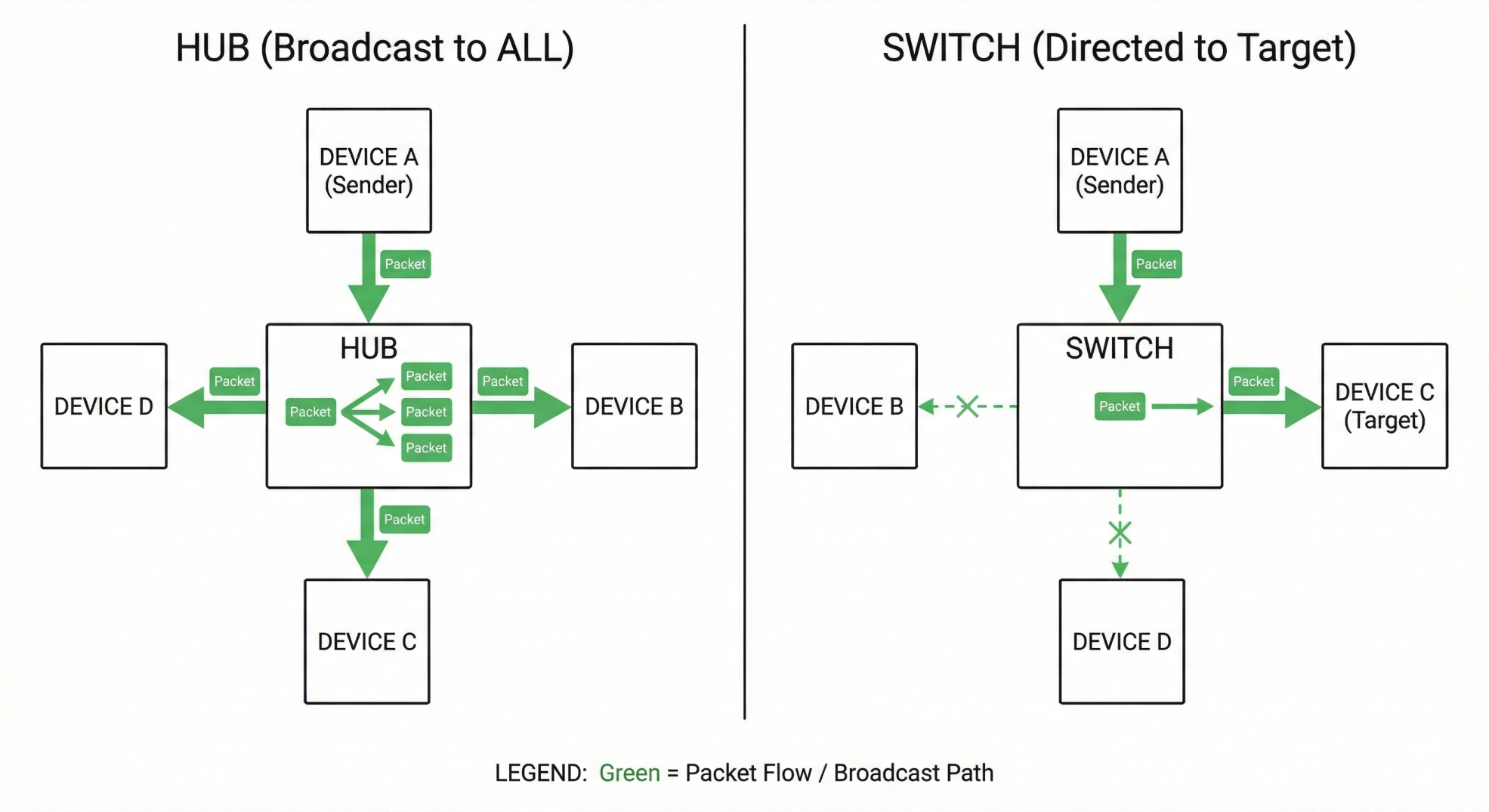
Before diving deeper, it's important to understand these two devices because they're the source of much confusion, and understanding their differences teaches you something fundamental about network intelligence.
The Hub: Simple but Inefficient
A hub is the simplest network device. When it receives data on one port, it blasts that data out all other ports simultaneously.
How it works:
Data packet arrives on port 1 (from your laptop)
Hub forwards it to ports 2, 3, 4, 5 (all other devices)
Every device receives the data, even if it wasn't meant for them
Only the device with the matching address keeps it; others ignore it
Key limitations:
No intelligence: Can't learn MAC addresses (device identifiers)
Half-duplex only: Can send or receive, not both simultaneously
Collision domain: When two devices send at the same time, their signals collide and both have to resend
Bandwidth sharing: All devices on a hub share the same bandwidth—if one device uses heavy traffic, everyone else slows down
Cannot filter: No way to prioritize traffic or block unwanted packets
Few ports: Usually 4–12 ports only
A hub is like a town crier announcing everything to everyone. If you need to send a message, the crier shouts it to the entire town, and the recipient has to recognize their name.
The Switch: Smart and Modern
A switch is like a hub's intelligent cousin. Instead of broadcasting to everyone, a switch learns which devices are on which ports and sends data only to the intended destination.
How it works:
Data packet arrives on port 3 (from your laptop, destination: printer)
Switch checks its MAC address table and sees the printer is on port 5
Switch forwards data only to port 5
The printer receives the data; no one else does
Key advantages:
Intelligent forwarding: Reads MAC addresses in data frames and learns device locations
Full-duplex: Can send and receive simultaneously at full speed
Separate collision domains per port: Each port is isolated, preventing collisions
Dedicated bandwidth: Each port gets full bandwidth; one device's traffic doesn't affect others
Packet filtering: Can examine packets and make intelligent forwarding decisions
Many ports: Typically 24–48 ports, suitable for larger networks
Memory: Stores MAC address mappings for intelligent forwarding
Real-World Analogy
A hub is like a mail carrier who, when receiving a letter, photocopy it and delivers it to everyone on the street. Each recipient checks if their name is on it and throws it away if not.
A switch is like a mail carrier who reads the address, checks their delivery list, and hands the letter only to the correct house.
Why Hubs Are Nearly Extinct
Switches are so superior that hubs have almost completely disappeared from modern networks. Switches are faster (over 10 times faster at forwarding data), more efficient, and cheaper than using multiple hubs. The only time you'd encounter a hub today is in very old installations or educational settings explaining network fundamentals.
The Switch: The Smart Distributor
The Problem It Solves
In the hub section, we explained the problem. Now let's dive deeper into how a switch solves it in a real office or data center environment.
Imagine you have 30 people in an office, all on the same network. Without a switch, traffic would constantly collide, everyone would experience constant slowdowns, and data would frequently need to be resent. A switch solves this through intelligent forwarding.
Where It Sits in Your Network
In a home network, you probably don't need a switch—your router handles small traffic volumes fine.
In an office or data center, a switch is the backbone:
Connects to the router or core network infrastructure (uplink port)
Connects to all devices in that location (access ports): computers, printers, phones, servers
What Data It Handles
The switch handles all local traffic: any communication between devices on the same physical location. This includes:
PC1 sending a file to the network printer
PC2 requesting data from a file server
Someone's computer updating via the update server
Operating Layer
This is important: A switch operates at Layer 2 (Data Link layer) of the OSI model. This means it understands MAC addresses (physical device identifiers like 00:1A:2B:3C:4D:5E) but not IP addresses. This is why switches are faster than routers—they don't have to do complex IP lookups.
Core Functions
Learning: When a device sends data on a port, the switch records that device's MAC address and port number
Forwarding: Using its MAC address table, it forwards frames only to the intended port
Filtering: Examines packet headers and prevents unnecessary traffic from crossing ports
Spanning tree protocol: Prevents loops in the network that would cause data to circulate forever
Real-World Analogy
A switch is like an internal postal system within a building. It knows that mailroom is in the basement, accounting is on floor 3, and engineering is on floor 5. When mail arrives, it routes directly to the right location without disturbing everyone else.
The Firewall: Your Network's Security Guard
The Problem It Solves
Imagine your office network like a building. Without a security guard at the entrance, anyone could walk in and access servers, steal data, or plant viruses. Your firewall is that security guard.
A firewall monitors all traffic entering and leaving your network and decides what's allowed based on predefined security rules. It's your first line of defense against:
Unauthorized access attempts
Malware and viruses
Hacking attempts
Data theft
Suspicious outgoing connections
Where It Sits in Your Network
Firewalls exist at multiple levels:
Home/Small Office:
Usually built into your router
Sits between your devices and the modem
Corporate/Data Center:
At the network perimeter (between the internet and internal network)
Between departments or sensitive systems
On individual servers (software firewalls)
What Data It Handles
Every single packet entering or leaving the network must pass through the firewall for inspection. The firewall examines:
Source IP address (where is this coming from?)
Destination IP address (where is this going?)
Port numbers (which service is this trying to access?)
Protocol type (is this TCP, UDP, HTTP, etc.?)
Packet content (known malicious signatures?)
How It Makes Decisions
The firewall operates in five steps:
Traffic Monitoring: Constantly watching all incoming and outgoing traffic
Rule Application: Comparing each packet against a security ruleset (e.g., "Allow HTTP from anyone, block SSH except from office IPs")
Packet Inspection: Examining headers and content for suspicious patterns
Decision Making: Allowing legitimate traffic; blocking threats
Logging and Alerting: Recording actions and generating alerts for serious threats
Types of Firewalls
Stateless Firewall:
Examines each packet in isolation
No memory of previous packets
Fast but simple
Stateful Firewall:
Remembers previous packets and connections
Understands when you initiate an outgoing connection and only allows responses to that connection
Can keep ports closed until specifically requested
Example: Your home router's built-in firewall
Next-Generation Firewall (NGFW):
Examines application-level data, not just headers
Uses machine learning to detect anomalies
Blocks malware, not just rule violations
Can differentiate between streaming video and malicious traffic even on the same port
Real-World Analogy
A firewall is like a security checkpoint at a border. Guards check documents (packet headers), verify against a list of known criminals (threat database), and follow a rulebook (security policies). They keep detailed logs of everyone who passes through.
The Load Balancer: Preventing Bottlenecks
The Problem It Solves
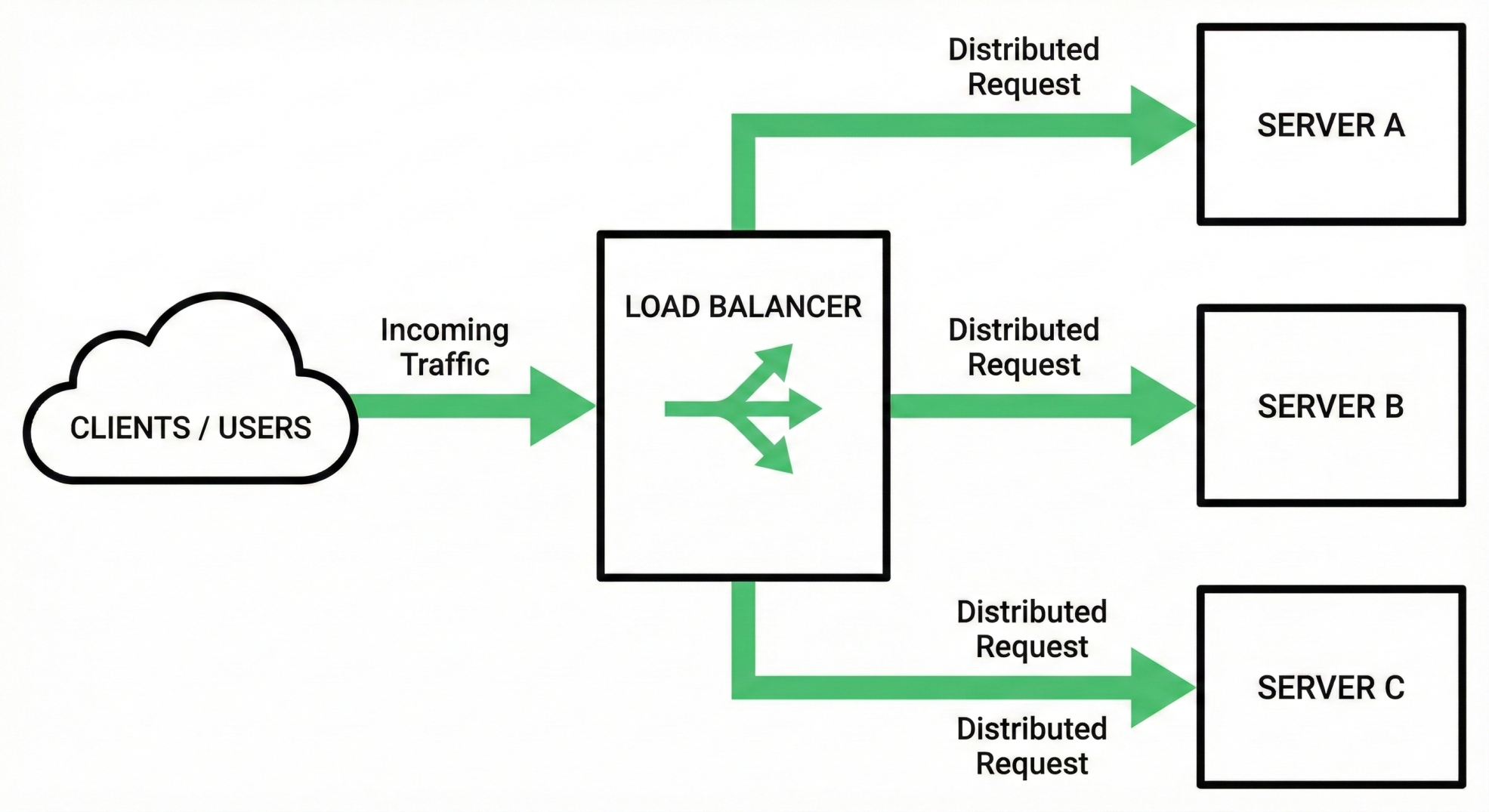
Imagine your app gets featured in the news and suddenly 10,000 people try to access it simultaneously. One server can't handle that traffic. You'd need multiple servers running in parallel. But now a new problem emerges: which server should each request go to?
If all traffic goes to server 1, it gets overloaded while servers 2 and 3 sit idle. The load balancer solves this by distributing incoming requests across multiple servers intelligently.
Where It Sits in Your Network
Load balancers exist at several tiers:
For web services:
Sits between users and web servers
Receives all incoming HTTP/HTTPS requests
Forwards each request to the best available server
For APIs:
Sits between API clients and backend servers
Balances microservice traffic
Ensures no single service gets overwhelmed
In data centers:
Often deployed in pairs for redundancy
Can balance traffic across multiple availability zones
Acts as the single point of contact for all external requests
What Data It Handles
Every incoming request from external users/services
Decides which backend server gets the request
May add or modify headers to track the request
Returns responses from backend servers to the client
How Load Balancing Works
The process happens in four steps:
Request arrives at the load balancer's IP address
Health check: Load balancer verifies backend servers are healthy and responding
Algorithm decision: Using an algorithm, the load balancer selects which server gets this request
Forwarding: Request is sent to the selected server; response is returned to the client
Balancing Algorithms
Different strategies for distributing load:
Round-robin: Send requests to servers 1, 2, 3, 1, 2, 3 in sequence
Least connections: Send to whichever server currently has fewest active requests
Least response time: Send to the server responding fastest
Weighted: Some servers might be more powerful; give them more traffic
IP hash: Same client IP always goes to the same server (useful for session persistence)
Why This Matters for Backend Engineers
As a backend engineer building scalable systems, load balancers are fundamental infrastructure you'll interact with regularly. They enable:
High availability: If one server fails, requests go to others
Scalability: Add more servers without changing client code
Performance: No single server becomes a bottleneck
Graceful degradation: System remains partially available under extreme load
Real-World Analogy
A load balancer is like a receptionist at a busy restaurant. When customers arrive, the receptionist checks which dining room has available tables and shortest wait time, then seats them accordingly. If one dining room gets too crowded, future customers go elsewhere.
All Together: Real-World Network Architectures
Now that we understand individual devices, let's see how they work together in three scenarios: home, office, and production systems.
Home Network Architecture
[Internet/ISP]
      ↓
   [Modem] ← Translates ISP signal
      ↓
   [Router] ← Distributes to home devices
      ↓
   [Devices: Phone, Laptop, TV, Printer, etc.]
Packet flow when you browse a website:
You type google.com in your laptop
Laptop sends a request with destination IP = Google's servers, source IP = 192.168.1.5 (private)
Router receives it and translates: destination IP = Google's servers, source IP = ISP's public IP (via NAT)
Router sends it to the modem
Modem translates the signal and sends through ISP infrastructure
Google receives it, processes, and responds
Response travels back: Modem → Router → Laptop
The router's built-in firewall silently drops any incoming requests that don't match an outgoing request you initiated. Without this, hackers could directly access your devices.
Office Network Architecture
[ISP] → [Modem] → [Router/Firewall] → [Switch] → [Office Devices]
                                          ↓
                              [Printers, Computers, Phones]
Key differences from home:
Separate firewall: Likely a dedicated device, not part of the router
Switch instead of direct connections: With 30+ devices, you need a switch
Possibly multiple switches: Each floor might have its own switch, connected to core switch
VLAN support: You might segment departments, so finance data stays isolated from customer service
What happens when someone prints:
Computer sends print job to printer's IP address
Router checks routing table: "Printer is on this network, forward to switch"
Switch checks its MAC address table: "Printer is on port 7"
Printer receives job and prints
The firewall monitors outgoing print jobs for suspicious behavior—if someone tried to print a 10 GB file every second, the firewall could flag this.
Production Data Center (Simplified)
[Internet]
    ↓
[DDoS Protection / CDN Edge]
    ↓
[Public Load Balancer] ← First stop for all traffic
    ↓
[Firewall / WAF] ← Application-level security
    ↓
[Internal Load Balancer] ← Distributes across services
    ↓
[Service 1 Cluster] [Service 2 Cluster] [Service 3 Cluster]
    ↓                     ↓                      ↓
[Servers]            [Servers]              [Servers]
    ↓                     ↓                      ↓
[Database Cluster] [Cache Cluster] [Message Queue]
What happens when your API receives 10,000 requests per second:
Public load balancer receives all 10,000 requests
It distributes: 3,333 to Service A, 3,333 to Service B, 3,334 to Service C
Each service's internal load balancer distributes again across its servers
Firewall logs pattern: "10,000 requests from same IP in 1 second" - Triggers rate limiting
Service responds and load balancer returns response to client
If one server crashes, load balancer automatically stops sending traffic there
This is why understanding load balancers matters: your API could fail due to poor distribution even if your code is perfect.
How These Devices Talk: The Data Packet Journey
Let's trace what actually happens when you send data through this network of devices.
Scenario: Your laptop (IP: 192.168.1.5) wants to reach an external API (IP: 1.2.3.4).
Step 1 - Laptop Application Layer:
Your code makes an HTTP request: GET https://api.example.com/users
Step 2 - Laptop TCP/IP Stack:
Operating system wraps this in TCP/IP: "Send this to 1.2.3.4 using port 443"
Step 3 - Laptop → Router (via Switch if in office):
But wait, the laptop doesn't know how to reach 1.2.3.4. It knows 1.2.3.4 isn't on its local network (192.168.0.0/24). So it asks: "Hey router (192.168.1.1), how do I reach 1.2.3.4?"
This question uses ARP (Address Resolution Protocol). The laptop sends to the router's port asking "What's your MAC address?" The router responds with its MAC address.
Step 4 - Router NAT Translation:
Router receives the packet with:
Source IP: 192.168.1.5 (your laptop's private IP)
Destination IP: 1.2.3.4
Source Port: 54321 (random port on your laptop)
Destination Port: 443 (HTTPS)
Router translates it:
Source IP: 203.0.113.45 (ISP's public IP assigned to your router)
Destination IP: 1.2.3.4
Source Port: 60000 (remapped port)
Destination Port: 443
Router keeps a table: "Port 60000 maps to 192.168.1.5:54321"
Step 5 - Router → Modem:
Packet travels to modem.
Step 6 - Modem Translation:
Modem converts: "Okay, this needs to go out to the ISP network at port 443. Let me convert to the format the ISP uses."
Step 7 - Through ISP Network:
The packet travels through multiple ISP routers and firewalls.
Step 8 - Arriving at api.example.com:
Server receives the packet and responds with your data.
Step 9 - Return Journey:
The response travels back to the modem, which translates it back to home network format.
Step 10 - Router Reverse Translation:
Router checks its NAT table: "Port 60000 maps to 192.168.1.5. Send this response there."
Step 11 - Laptop Receives:
Your laptop receives the response and your application processes it.
This entire journey takes milliseconds. Every device played its role:
Modem: Signal translator
Router: Address translator and gateway
Switch (if in office): Directed frames to the right port
Firewall (if present): Verified traffic against rules
Firewall and Load Balancer in Production: Why They Matter
As a backend engineer, you might wonder: "I write the code. Do I need to understand these devices?"
The answer is absolutely yes. Here's why:
Load Balancers and Your API
When you deploy an API, it doesn't just magically accept millions of requests. A load balancer distributes those requests across multiple instances of your server. If your API isn't load balancer aware, you might encounter:
Session persistence issues: A user logs in on server 1, but next request goes to server 2, which has no session data
Database connection saturation: If you're not connection pooling, each request might create a new database connection, and the load balancer has no insight into this
Uneven distribution: If your load balancer uses round-robin but your requests vary in complexity, some servers get hammered while others sit idle
Firewalls and Your Traffic Patterns
A firewall's security rules affect your API's performance:
DDoS protection: Legitimate traffic from a botnet IP gets blocked
Rate limiting: Overly aggressive limits can throttle legitimate bursts
Port blocking: If your microservice communicates on port 9000 but firewall only allows 80/443, traffic fails silently
Data Center Architecture and Scalability
Understanding load balancers helps you design scalable systems:
Know that your traffic will be distributed, so don't store state locally on servers
Design APIs to be stateless—each request should work on any server
Implement health checks in your API (e.g.,
/healthendpoint) so the load balancer knows when you're healthyUse circuit breakers when calling other services—if downstream service is overloaded, don't add more traffic
Key Distinctions Summary
| Device | Primary Function | Layer | Decision Factor | Real-World Analogy |
| Modem | Translate ISP signal ↔ digital data | Physical/Data Link | Modulate/Demodulate | Translator at customs |
| Router | Distribute ISP connection to home devices; NAT | Network (Layer 3) | IP address | Postal worker in town |
| Hub | Broadcast to all ports | Physical (Layer 1) | None (sends to all) | Town crier announcing to all |
| Switch | Forward to specific port based on MAC | Data Link (Layer 2) | MAC address table | Postal worker routing to buildings |
| Firewall | Monitor/block traffic per rules | Network/Application (Layers 3-7) | Security rules | Border security checkpoint |
| Load Balancer | Distribute requests across servers | Transport/Application (Layers 4-7) | Algorithm (round-robin, least connections, etc.) | Restaurant receptionist seating |
Conclusion: Why This Matters for Software Engineers
You might build the most elegant API, but if network devices are misconfigured, your users experience timeouts and failures. Understanding how these devices work helps you:
Design better systems:
Know that load balancers won't maintain sessions, so design stateless APIs
Understand that firewalls will block unusual traffic patterns, so don't exceed rate limits suddenly
Realize switches have per-port collision domains, so high-traffic services might need dedicated hardware
Debug production issues:
API slow? Check if load balancer is distributing unevenly
Users in certain countries can't access? Firewall might be blocking their IP range
New service deployment failing? Firewall ports might need opening
Database connection errors under load? The load balancer might not be health-checking correctly
Scale confidently:
Know how to make services horizontally scalable (handled by load balancers)
Implement health checks so load balancers can make intelligent routing decisions
Design for graceful degradation when firewall rate limits trigger
Understand backhaul and edge routing when deploying globally
Communicate with infrastructure teams:
Understand what network architects are talking about
Ask better questions about why deployments failed
Propose architectural changes informed by networking knowledge
The internet that seems magical to end users is actually dozens of specialized devices, each solving one problem well, working together in sequence. As a backend engineer, understanding this sequence transforms you from someone who "writes server code" into someone who truly understands how applications reach the world.


